Plugin
Plugin will be publicly allow for all merchants to install, if you need to build a private plugin you will need add some validation when you're decoding the signed request.
Setup Plugin
▾
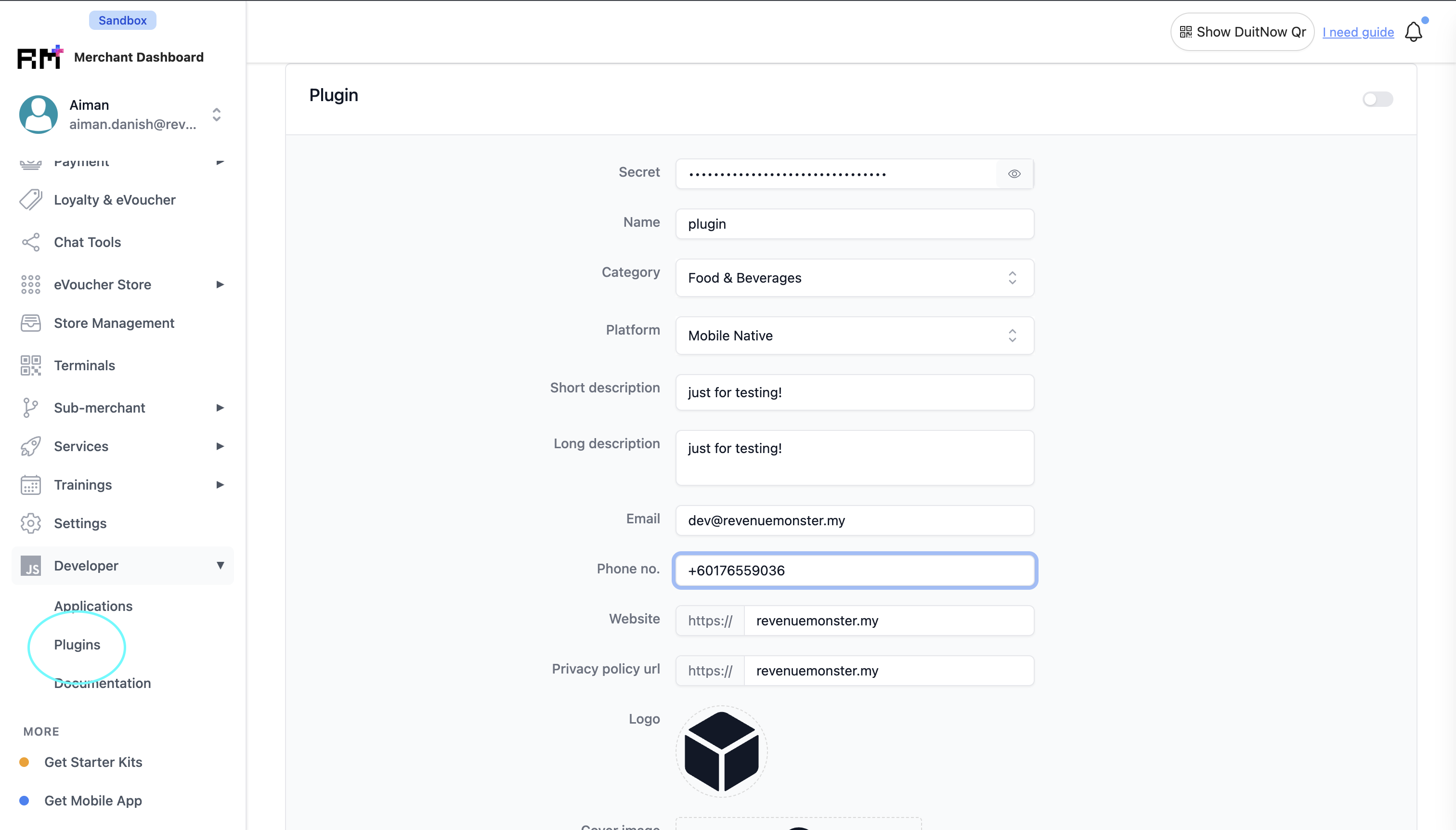
You can create plugin from your merchant portal, and specifying the platform and category. The platform is important based on your integration type,
- If you're building mobile app or terminal plugin will be
Mobile Native - If you're building for web will be
Web Portal.
You can save your secret key from the portal it's needed when you're decoding the signature.
Authorize Setup ( Signed Request )
▾
The way of plugin authorize the merchant is via plugin signed request. Signed request contains all of the required information that enough to determine who is using such as identifier, role and platform.
Example & Structure
▾
Here an example of a signed request, it contains 2 segments and split by ".". The first segment was signature use for verifying the validity of the signed request and second segment will be the merchant data and information.
_FuBOoZR8iGNThRTj9FpEfcBPI4Jhh6ZGPqMU76HnSA=.eyJtZXJjaGFudElkIjoiNDExODE2NTIwMzY3OTY2ODg4NSIsIm5vbmNlU3RyIjoiMTY4ODEwMjQwMiIsInBsYXRmb3JtIjoiV0VCX1BPUlRBTCIsInJlZmVyZW5jZUlkIjoiODE5MDY1NjA0NTE2NjIzMjcxNiIsInJlZmVyZW5jZUxhYmVsIjoiREVWIFJNUyIsInJlZmVyZW5jZVJvbGUiOiJPV05FUiIsInJlZmVyZW5jZVR5cGUiOiJVU0VSIiwic3RvcmVJZHMiOltdLCJzdWJzY3JpcHRpb25FeHBpcmVkQXQiOiIyMDUwLTEyLTMxVDIzOjU5OjU5WiIsInN1YnNjcmlwdGlvblN0YXR1cyI6IkFDVElWRSIsInRpbWVzdGFtcCI6IjE2ODgxMDI0MDIiLCJ1cmwiOiJodHRwOi8vMTI3LjAuMC4xOjU1MDAvaW5kZXguaHRtbCIsInVzZXJDb3VudHJ5Q29kZSI6IjYwIiwidXNlcklkIjoiODE5MDY1NjA0NTE2NjIzMjcxNiIsInVzZXJQaG9uZSI6IjEyODUzNDQ4OCJ9
Signature Verification
▾
Once you have the first segment of data you can verify the signature using signing step below.
- Base64 URL decode the first segment of data
- Initialize signer HMAC-SHA256 with Secret Key
- Write second segment of data to signer
- Generate signature
- Check signature with first segments
Example Code in Go
1package main2import (3"crypto/hmac"4"crypto/sha256"5"encoding/base64"6"fmt"7"strings"8)9func main() {10secretKey := "some_secret_key_from_portal"11signedRequest := "_FuBOoZR8iGNThRTj9FpEfcBPI4Jhh6ZGPqMU76HnSA=.eyJtZXJjaGFudElkIjoiNDExODE2NTIwMzY3OTY2ODg4NSIsIm5vbmNlU3RyIjoiMTY4ODEwMjQwMiIsInBsYXRmb3JtIjoiV0VCX1BPUlRBTCIsInJlZmVyZW5jZUlkIjoiODE5MDY1NjA0NTE2NjIzMjcxNiIsInJlZmVyZW5jZUxhYmVsIjoiREVWIFJNUyIsInJlZmVyZW5jZVJvbGUiOiJPV05FUiIsInJlZmVyZW5jZVR5cGUiOiJVU0VSIiwic3RvcmVJZHMiOltdLCJzdWJzY3JpcHRpb25FeHBpcmVkQXQiOiIyMDUwLTEyLTMxVDIzOjU5OjU5WiIsInN1YnNjcmlwdGlvblN0YXR1cyI6IkFDVElWRSIsInRpbWVzdGFtcCI6IjE2ODgxMDI0MDIiLCJ1cmwiOiJodHRwOi8vMTI3LjAuMC4xOjU1MDAvaW5kZXguaHRtbCIsInVzZXJDb3VudHJ5Q29kZSI6IjYwIiwidXNlcklkIjoiODE5MDY1NjA0NTE2NjIzMjcxNiIsInVzZXJQaG9uZSI6IjEyODUzNDQ4OCJ9"12segments := strings.Split(signedRequest, ".")13if len(segments) != 2 {14 panic("invalid signed request")15}16signer := hmac.New(sha256.New, []byte(secretKey))17signer.Write([]byte(segments[1]))18if base64.URLEncoding.EncodeToString(signer.Sum(nil)) != segments[0] {19 panic("invalid signed request signature")20}21fmt.Print("valid signature")22}
Merchant Data & Information
▾
From the second segment of the signed request, you can obtain the data by Base64URL decode then you will got the JSON data from the signed request.
1{2"merchantId": "4118165203679668885",3"nonceStr": "1688102402",4"platform": "WEB_PORTAL",5"referenceId": "8190656045166232716",6"referenceLabel": "DEV RMS",7"referenceRole": "OWNER",8"referenceType": "USER",9"storeIds": [],10"subscriptionExpiredAt": "2050-12-31T23:59:59Z",11"subscriptionStatus": "ACTIVE",12"timestamp": "1688102402",13"url": "http://127.0.0.1:5500/index.html",14"userCountryCode": "60",15"userPhone": "128534488"16}
Webview Setup
▾
Webview will have to handle the postMessage from our application and using the signed request from us will need to pass it to your backend to proceed with decoding, verifying and your own business logic.
Most of the function are using browser native feature so all the rules still remains by default such as storage limit for session, local storage and cookie.
Initialize Handshake
▾
While initialize / rendering the view our application will send a signed request to you and that's mean initialize is completed after that you will able proceed your own views. Example of VanillaJS code to initialize the receiver and also sender, once initialize complete you will be able communicate with our application. For the message handler to handling the response from our application please refer Message Handler.
1var initialized = false;2var signedRequest = "";3var appWindow = null;4var appOrigin = null5var sendMessage = function (message) {6 appWindow.postMessage(JSON.stringify(message), appOrigin);7}8function onReceiveMessage(data) {9 // your business logic for the response will be here10}11window.addEventListener('message', function (event) {12 if (initialized) {13 return onReceiveMessage(event.data)14 }15 initialized = true16 signedRequest = event.data17 appWindow = event.source18 appOrigin = event.origin19 sendMessage({ action: 'FINISH_HANDSHAKE' })20})
Request & Message Handler
▾
With the request communication with our application you're able to utilize the browser features like cookies, local storage, session storage and mores to provide better experience for your development so you don't need to worried about it might not working in webview.
Some of the request is one-way action so you will be expected no response from our application.
Finish Handshake
▾
To inform our application the handshake step is completed.
Request postMessage:
1{2"action": "FINISH_HANDSHAKE"3}
Get Signed Request
▾
To get the signed request. Most of the time you will get it when initialize so this function will be rarely use.
Request postMessage:
1{2"action": "REQUEST_SIGNED_REQUEST"3}
Response:
1{2"action": "REQUEST_SIGNED_REQUEST",3"data": "_FuBOoZR8iGNThRTj9FpEfcBPI4Jhh6ZGPqMU76HnSA=.eyJtZXJjaGFudElkIjoiNDExODE2NTIwMzY3OTY2ODg4NSIsIm5vbmNlU3RyIjoiMTY4ODEwMjQwMiIsInBsYXRmb3JtIjoiV0VCX1BPUlRBTCIsInJlZmVyZW5jZUlkIjoiODE5MDY1NjA0NTE2NjIzMjcxNiIsInJlZmVyZW5jZUxhYmVsIjoiREVWIFJNUyIsInJlZmVyZW5jZVJvbGUiOiJPV05FUiIsInJlZmVyZW5jZVR5cGUiOiJVU0VSIiwic3RvcmVJZHMiOltdLCJzdWJzY3JpcHRpb25FeHBpcmVkQXQiOiIyMDUwLTEyLTMxVDIzOjU5OjU5WiIsInN1YnNjcmlwdGlvblN0YXR1cyI6IkFDVElWRSIsInRpbWVzdGFtcCI6IjE2ODgxMDI0MDIiLCJ1cmwiOiJodHRwOi8vMTI3LjAuMC4xOjU1MDAvaW5kZXguaHRtbCIsInVzZXJDb3VudHJ5Q29kZSI6IjYwIiwidXNlcklkIjoiODE5MDY1NjA0NTE2NjIzMjcxNiIsInVzZXJQaG9uZSI6IjEyODUzNDQ4OCJ9"4}
Open New Link
▾
To open up new link url on user browser.
Request postMessage:
1{2"action": "WHATS_APP_LINK",3"message": "https://google.com"4}
Toggle Loader
▾
To trigger loader, will work as on/off strategy.
Request postMessage:
1{2"action": "TOGGLE_LOADER"3}
Show Notification ( Toast )
▾
To show toast notification to user
Request postMessage:
1{2"action": "SHOW_NOTIFICATION",3"message": "some notification message toast"4}
Set Cookie
▾
Set the cookie value with type as a key
Request postMessage:
1{2"action": "SET_COOKIE",3"type": "some_key",4"message": "some_value"5}
Set Session Storage
▾
Set the session storage value with type as a key
Request postMessage:
1{2"action": "SET_SESSION_STORAGE",3"type": "some_key",4"message": "some_value"5}
Set Local Storage
▾
Set the local storage value with type as a key
Request postMessage:
1{2"action": "SET_LOCAL_STORAGE",3"type": "some_key",4"message": "some_value"5}
Delete Cookie
▾
Delete the cookie value with type as a key
Request postMessage:
1{2"action": "REMOVE_COOKIE",3"type": "some_key"4}
Delete Session Storage
▾
Delete the session storage value with type as a key
Request postMessage:
1{2"action": "REMOVE_SESSION_STORAGE",3"type": "some_key"4}
Delete Local Storage
▾
Delete the local storage value with type as a key
Request postMessage:
1{2"action": "REMOVE_LOCAL_STORAGE",3"type": "some_key"4}
Get Cookie Value
▾
Get the cookie value with type as a key
Request postMessage:
1{2"action": "GET_COOKIE",3"type": "some_key"4}
Response:
1{2"type": "some_key",3"action": "GET_COOKIE",4"data": "some_value"5}
Get Session Storage Value
▾
Get the session storage value with type as a key
Request postMessage:
1{2"action": "GET_SESSION_STORAGE",3"type": "some_key"4}
Response:
1{2"type": "some_key",3"action": "GET_SESSION_STORAGE",4"data": "some_value"5}
Get Local Storage Value
▾
Get the session storage value with type as a key
Request postMessage:
1{2"action": "GET_LOCAL_STORAGE",3"type": "some_key"4}
Response:
1{2"type": "some_key",3"action": "GET_LOCAL_STORAGE",4"data": "some_value"5}